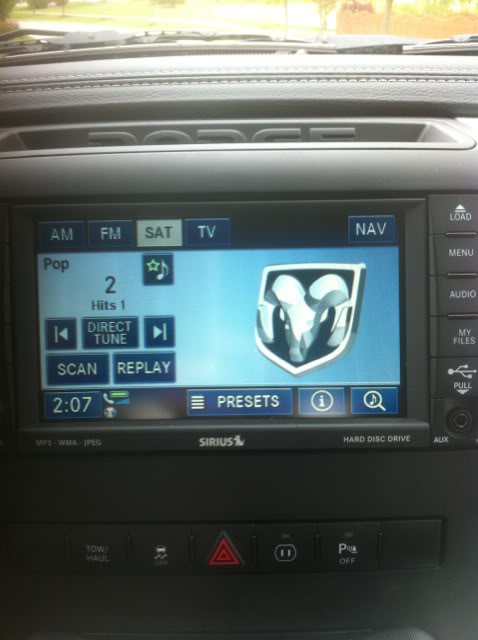
Jump to content

  • Log in with Facebook Log in with Twitter Log in with Windows Live Log In with Google Sign In
  • Create Account
Welcome to Modern Mopar Forum
Register now to gain access to all of our features. Once registered and logged in, you will be able to create topics, post replies to existing threads, give reputation to your fellow members, get your own private messenger, post status updates, manage your profile and so much more. This message will be removed once you have signed in.
Login to Account Create an Account
Photo

2010 Lockpick Install


  • Please log in to reply
6 replies to this topic

#1
CaptRon

CaptRon

    Senior Jack Wagon

  • Lifetime Member
  • 2,545 posts

I got this from another one of them FORUMZ.


http://www.ramforumz...ead.php?t=86989


1st thing to do was take apart the dash.
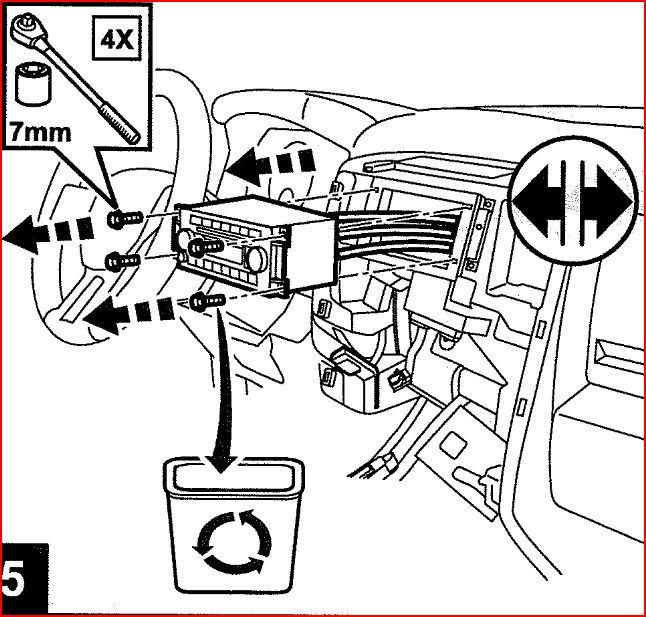
RadioRemovel.jpg

Next thing is to plug the Lockpick in (No picture for this step). There are two large plugs on the back of the mygig which come out of the head unit and plug into the Lockpick. The Lockpick then plugs into the back of the head unit. Seriously plug and play.

Here is a stock photo of the Lockpick wiring

Now that I have the headunit plugged in, I ran power for my camper camera and a future front camera.

A couple pics of the install process

Remember to set the dip switches BEFORE you power everything up. I forgot to set the switches first and it did NOT work right. Depending on what system you have will depend on which switches to set.

I ran the ipod cable to the glove box as well as the USB cable it comes with so you can update it when the updates are available.

Turn everything on and you have a new button next to the Radioicon1.png, SAT, AUX buttons known as TV.

lockpickmainscreen.jpg

Also a note to those who already have the TV button as part of a Sirrius package. From the instructions:

Now I have full control of the ipod (4th gen ipod touch) in the glove box from the steering wheel controlsicon1.png, unlocked video on demand, and I can change my navigation (or my passenger can) while on the move.

I also have control of the factory backup cam to view while I'm drivingicon1.png if I need. For the 2011, there is NO need to run a separate power wire for this to work. When you are done plugging it all in, it will work.

Total install time couldn't have been more than an hour. The dash really comes apart easy and the Lockpick is plug and play. There is a ton of room behind the dash to store the Lockpick and if you ever had to take it out if you wanted to, nothing is permanent.


http://www.ramforumz...ead.php?t=86989


  • 0
Posted Image

#2
rudedog

rudedog

    Lifetime Member

  • Lifetime Member
  • 356 posts
Garage View Garage

I recommend placing the lockpick unit in the glove box as a whole.  This way if you ever need to replace it or want to connect other cameras, you have easy access to it. You will never need the USB as they told me they upgrade the whole unit when they do, do upgrades


Nice instructions


  • 0
Not so Rude - Rudedog

registrysig_5663.png

2010 Challenger R/T Classic | Plum Crazy Pearl | 6sp | sun roof | STP | Leather | Sound Group II w/Nav (730N) | MOROSO Tanks| Lockpick v.4 w/cam | Petty Garage front/back/frame bars | Trinity-Custom tuned by OSTmike | Hust S/T shifter | BT Engine bling | PASSPORT Qi45 | AT cat back | JBA shorties | Hi-flow cats | Magnison Supercharger @8lbs | API Dual Fuel Pump

#3
CaptRon

CaptRon

    Senior Jack Wagon

  • Lifetime Member
  • 2,545 posts

Yea mine is already installed. My radio crapped out on me yesterday and I couldn't remember how to get the darn thing out of my truck. Took me forever to find that writeup. Thought I had better post it up here. Truck has a 100K warranty and I'm at 81K but the service manager says that the radio probably is not covered if I don't have an extended warranty. Looks like I may need to find another radio and install it myself cause I ain't paying them full price for it.


  • 0
Posted Image

#4
rudedog

rudedog

    Lifetime Member

  • Lifetime Member
  • 356 posts
Garage View Garage

Remove the lock pick first (wiring harness behind radio) I've had two friends locally that the radio was dead however uninstalling the lock pick and putting the factory harness back into the radio fixed the issue.


Good luck


  • 0
Not so Rude - Rudedog

registrysig_5663.png

2010 Challenger R/T Classic | Plum Crazy Pearl | 6sp | sun roof | STP | Leather | Sound Group II w/Nav (730N) | MOROSO Tanks| Lockpick v.4 w/cam | Petty Garage front/back/frame bars | Trinity-Custom tuned by OSTmike | Hust S/T shifter | BT Engine bling | PASSPORT Qi45 | AT cat back | JBA shorties | Hi-flow cats | Magnison Supercharger @8lbs | API Dual Fuel Pump

#5
CruzKing

CruzKing

    blown mother fucker

  • Lifetime Member
  • 6,796 posts
Garage View Garage

Yea mine is already installed. My radio crapped out on me yesterday and I couldn't remember how to get the darn thing out of my truck. Took me forever to find that writeup. Thought I had better post it up here. Truck has a 100K warranty and I'm at 81K but the service manager says that the radio probably is not covered if I don't have an extended warranty. Looks like I may need to find another radio and install it myself cause I ain't paying them full price for it.

I have a 8 track with radio both am and fm for cheap. B)  :P


  • 0

Grandpa Greg      11SECONDS-CLUB.gif


Camarofest 5 2010
Challengerfest 1 2010
Challengerfest 2 2011
Challengerfest 3 2012

ChallengerFest 4 2013

ChallengerFest 5 2014

ChallengerFest 6 2015

MSHS various


PB ET 14.02 at CamaroFest 5 totally stock

PB RT .003 at Challengerfest 3
PB 0-60 3.80 Atco Raceway Drag Radials 11/14

PB 0-60 4.40 Street Tires on the street Calabash 10/14

PB ET 11.68 at CF6 4/15  (new)

PB 60' 1.65 at CF6 4/15 (new)

PB MPH 120.03 at MSHS ATCO 11/14


#6
CaptRon

CaptRon

    Senior Jack Wagon

  • Lifetime Member
  • 2,545 posts
Thx Gregg! I'll keep that in mind. 😕
Turns out that I have a Maxicare warranty. Whatever that is. Guy says it should be covered.
  • 0
Posted Image

#7
CaptRon

CaptRon

    Senior Jack Wagon

  • Lifetime Member
  • 2,545 posts

Remove the lock pick first (wiring harness behind radio) I've had two friends locally that the radio was dead however uninstalling the lock pick and putting the factory harness back into the radio fixed the issue.


Good luck

Yea tried that. Didn't work. the uconnect screen comes up and then goes out. It does this every few minutes.


  • 0
Posted Image


0 user(s) are reading this topic

0 members, 0 guests, 0 anonymous users